
You might experience an interruption when signing in through the website to a Video Connect session with your loved one at a Securus- or JPay-served facility. Some users are seeing a message asking them to install “Securus VRE,” but are unable to finish installing it, which stops them from joining their video session.
This has happened because of recent browser updates released by Google and Microsoft. While we work on making Chrome and Edge fully compatible with Video Connect again, the easiest way to keep your sessions running smoothly is to use the Mozilla Firefox browser.
Scheduled video calls through the Securus Mobile app continue without interruption, so using the mobile app remains a reliable alternative.
Switching browsers is simple:
-
- Download Mozilla Firefox
- Install the browser by following the on-screen instructions.
- Sign in to your Securus or JPay account and launch Video Connect in the new browser.
Another alternative is to change your Chrome browser settings
Step 1: Change Chrome Settings for the Website
- Open Google Chrome on your computer.
- Go to this website: https://securustech.net/.
- Look at the top of the browser, in the address bar, and click the lock icon (or it might look like an “info” icon).
- From the menu that appears, click Site settings.
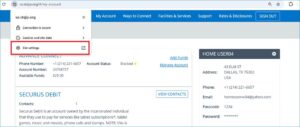
- Scroll down until you see Additional permissions.
- If you don’t see it, use the search box and type Local network access.
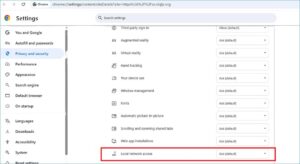
- Find Local network access and change it to Allow.
- It might say Block after a Chrome update, so make sure it’s set to Allow.
- Go back to the page and reload it (click the refresh button).
- Try launching the client again.
Step 2: Turn Off PNA in Chrome
- In Chrome, type this in the address bar: chrome://flags/#local-network-access-check and press Enter.
- Find the setting called Local network access check.
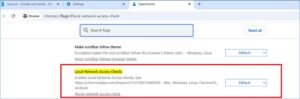
3. Change it to Disabled.
4. Close and relaunch Chrome (completely close it and open it again).